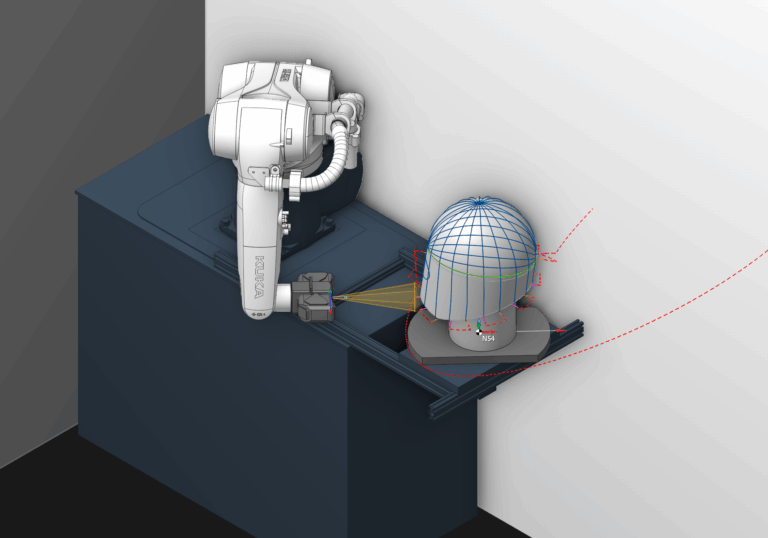
Integrating ENCY into a 3D scanning workflow

Let's integrate world-class robot control into your 3D scanning projects!

6 lessons30minTier 4
Sign in to enroll

About course

While ENCY doesn't have native 3D scanning functionality, it can still be used to implement and optimise your 3D scanning workflow. In this series, we look into using the Spray functionality to achieve a viable 3D scanning program. 

If you don't have access to the Spray functionality, it is possible to achieve similar results using Milling operations, although you will run into a lot of error messages regarding gouges. For tool definition, you'll need a tool that's sufficiently large to accommodate the cone of visibility from the scanner - in the case of the example scanner used in this video, that'd be something like an 80D x 200L x 20R Torus mill.

This project can be found in the Tutorials section of ENCY's online project catalogue, or it can be downloaded from this page.

Author

Files

Gerry Grainger

Used in the course — download before starting:

Gerry Grainger

Training content producer

Take the course and get a certificate!

Add this certificate to your resume to demonstrate your skills and increase your chances of getting noticed.

Certificate preview

Lessons

6 lessons to go

  1. 1Machine SetupSet up a 3D scanner as an end effector in MachineMaker by modeling the scanner and holder, ensuring proper calibration and collision detection. Use custom tool types, such as painting, to configure the setup and prepare collision detection data for simulation. This process is essential to avoid damaging equipment during operation.Video lesson
  2. 2Tool SetupDefine optimal tool settings for a 3D scanning operation using a rotary spraying technique. Adjust parameters such as working length, maximal spray distance, and cone angle to ensure effective scanning coverage and focus. Prepare for the next phase of rotary spraying setup.Video lesson
  3. 3Rotary SprayingDefine the cutting tool and complete the rotary spraying operation by setting the correct axis and adjusting overlap for optimal coverage. Ensure tool orientation and collision avoidance during setup, while utilizing linear toolpaths for effective scanning. Simulate the operation to verify complete object coverage before proceeding to the next contour-driven task.Video lesson
  4. 4Contour SprayingContouring techniques are applied to follow specific paths or trajectories on a model using the ENCY software. The process includes setting edge curves on surfaces, adjusting strategy to normal to surface, and generating tool paths while managing axis mapping and collision detection. Simulation confirms effective coverage for 3D scanning applications.Video lesson
  5. 5Surface SprayingSurface spraying operation covers the selection and assignment of machining surfaces, focusing on toolpath generation and axis mapping. It addresses issues related to surface normal orientation, cladding side settings, and tool orientation adjustments to achieve optimal results. The process emphasizes iterative troubleshooting for refining toolpaths in complex 3D models.Video lesson
  6. 6Morph SprayingThe morph operation involves setting up curves and machining surfaces to generate a toolpath. Key steps include adjusting tool axis orientation, configuring entry and exit links, and managing collisions during simulation. This process aims to create an efficient path for capturing detailed features in 3D scanning applications.Video lesson

Course discussion

Loading discussion…

0/6000