Building and using Fixtures

In fear of fixturing? Worry no longer - This course will show you everything you need to solve all your workholding woes!

4 lessons40minTier 214 languages
Sign in to enroll

About course

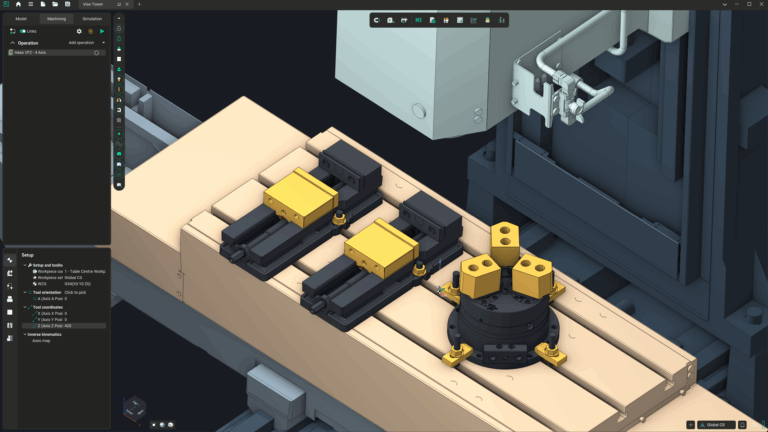
Fixtures - one of the most essential elements in machining, yet many CAM programs make including them unnecessarily complex. Fortunately, in ENCY it's not only easy, but it's also very powerful, and integrates immediately into the kinematic and collision detection frameworks of the software as well, meaning that you'll never have to worry again about whether you've got the approach path right to account for that slightly non-standard vice that's on your machine...

The attached toe clamp model is free for you to use - it's the one in the chuck and toe clamp lesson later on. 

Author

Files

Gerry Grainger

Used in the course — download before starting:

Gerry Grainger

Training content producer

Languages

العربيةDeutschEnglishEspañolFrançaisעבריתहिन्दीItaliano日本語한국어NederlandsPolskiPortuguês中文

Lessons

4 lessons to go

  1. 1Fixed-jaw vicesBuild a basic fixture system using a CURT fixed jaw vise model. Import the STEP file, define the vise components, and set constraints for jaw movement. Save and reuse the vise configuration for future machining jobs.Video lesson
  2. 2Self-centring vicesSet up a conventional 5-axis vice with opposing jaws in the machining environment. Adjust jaw properties, including count and movement limits, to ensure proper alignment and clearance for workpieces. Demonstrate the setup process using a part and explore the implications of jaw serration for effective gripping and machining.Video lesson
  3. 3Chucks and toe clampsSet up a 3-jaw chuck and toe clamps in a machining environment, focusing on defining their properties and range of motion. Import fixture components, adjust their positioning, and configure clamping mechanisms to create an effective clamping environment. Utilize Euler angles for precise motion control and save configurations for future use.Video lesson
  4. 4Compound fixture setupsThis module covers the setup of a hybrid Kurt Vice system, featuring eight clamping areas with sliding and fixed jaws. Participants learn to import and configure the jaws within a CAD environment, defining parameters such as movement direction and range. The process demonstrates efficient management of complex fixturing arrangements in a 5-axis milling machine.Video lesson

Course discussion

Loading discussion…

0/6000